10 Adobe Firefly Alternatives: Best AI Images in 2025?
I've spent a LOT of time playing with the various AI image generation tools over the years.
When Adobe Firefly was announced in early 2023, the generative fill function caught the attention of creators across the globe.
In this guide, I've put together the best Adobe Firefly alternatives that feature generative-fill-functionality.

#1 Midjourney 🥇
Midjourney is an industry favorite for image generation and has recently added a powerful generative fill functionality known as Vary(Region).
#2 Leonardo 🥈
Leonardo features AI image generation, pre-trained models, post-processing, and a generative canvas feature similar to Firefly's generative fill.
#3 Dall-E 3 🥉
Built right into ChatGPT, Dall-E 3's image generation offers super easy access for GPT Plus users and has come a long way since Dall-E 2.
#4 Runway
Runway is a close runner-up due to it's wide range of capabilities for AI image and video. Also features generative fill functionality.
#5 BlueWillow
BlueWillow provides affordable user-friendly AI image generation directly from Discord with basic generative fill functionality.
When choosing the right AI image generation tool for your needs, consider these factors:
- Image Quality: How good is the image output? Is it high quality?
- Generative Fill Capabilities: How well does the tool handle adding or removing elements from images?
- Customization: Are you able to modify various parameters to get exactly what you want?
- User Interface: Is the software easy to use? How long does it take to learn?
- Cost: Does the pricing align with your budget and usage needs?
These were the main considerations I took when determining the best Adobe Firefly alternatives in 2025!
Why Use An Adobe Firefly Alternative?
Even though Adobe Firefly is one of the top AI image generation tools on the market, there's a number of reasons creators are looking to use different tools to create images.
Quality
This is perhaps the most common reason creators are looking to move away from Adobe Firefly. Personally, I found options like Midjourney, Leonardo, and Dall-E 3 much better at creating images. With the addition of Midjourney's Vary(Region) functionality, there isn't much reason to choose Firefly when it comes to quality.
Accessibility
To use Adobe Firefly you must first sign up and create an account with Adobe. Although it's not a huge hassle, it can put off new users who might just be looking to try out the tool and see if they like it.
Variety
Unlike most of it's competitors, Adobe Firefly was trained on completely copyright free imagery. While this is great for users who might be worried about copyright implications, it has resulted in the overall variety of the output to be lacking quite a bit compared to it's competitors. There is also quite a heavy content filter on the images produced with Firefly, so prompts requesting images of celebrities and other potentially controversial topics do not work.
What is Adobe Firefly?
Adobe Firefly is a generative AI software tool released in 2023 that can create custom images from a natural language input, alongside a range of other automated image generation features.
Upon launch, Firefly attracted attention for its generative fill functionality which allowed users to insert, modify, and remove items from images with simple text prompts.

Firefly Generative Fill (GIF: Adobe)
Firefly has all the features we've come to love from AI image generation tools like text-to-image, image-to-image, 3D model-to-image, image recoloring, and image extension.
Firefly also features text effects which is an excellent feature as most AI generated images struggle with letting and correct spelling.
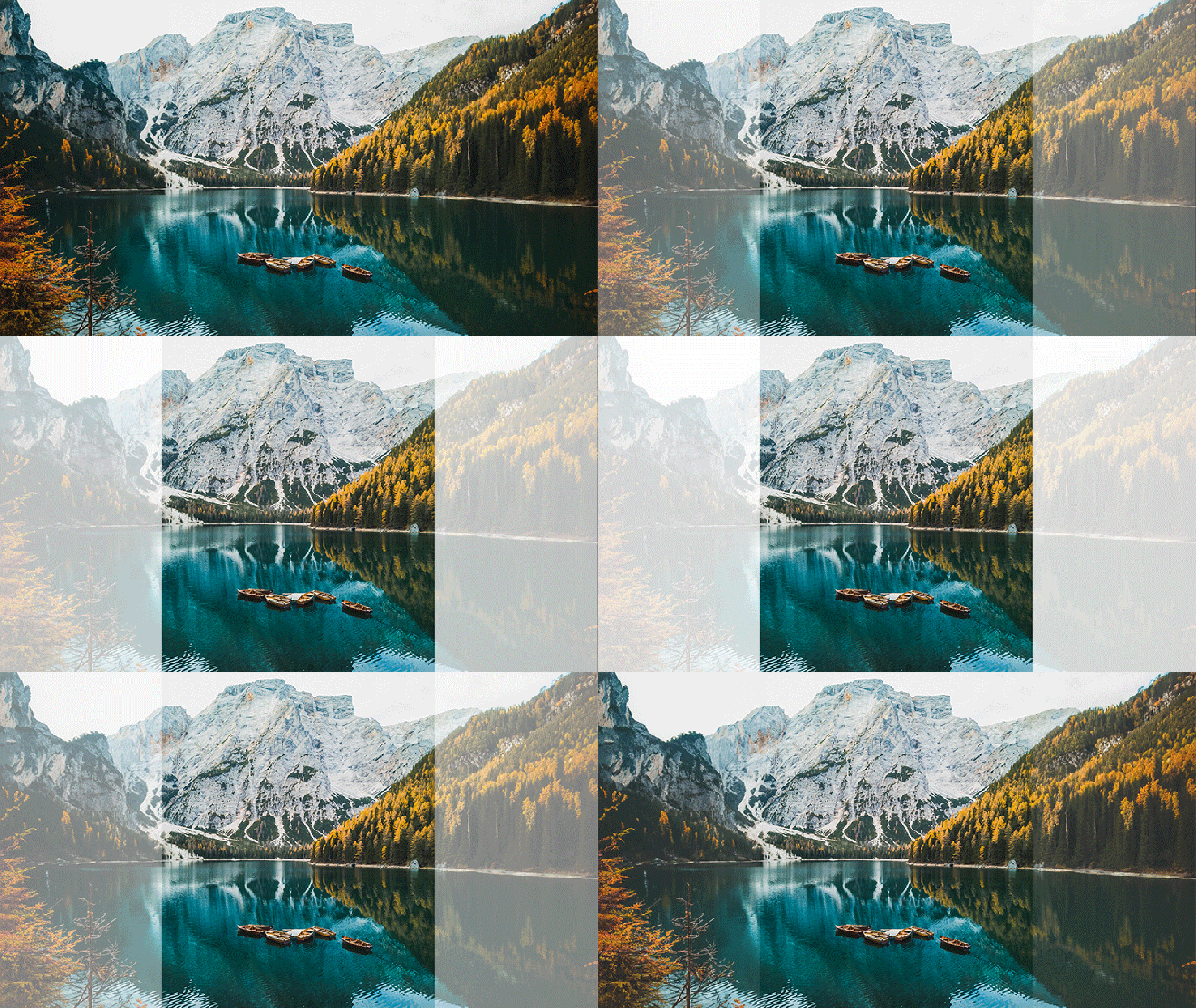
Firefly Image Extension (GIF: Adobe)
Adobe has built Firefly with ethical considerations in mind, meaning artists and creators are properly credited if their images were used in the training of the AI.
Firefly was trained from Adobe's stock library, as well as public domain images meaning no copyright issues for the users, or Adobe. This is a massive selling point for companies looking to avoid legal issues associated with AI image generation.
The addition of Firefly into Photoshop is a game changer for users allowing massive time savings and making the barrier to entry for using Photoshop much, much lower.
Key Features
- Generative Fill: Adobe Firefly introduces generative fill, allowing you to seamlessly insert, remove, or modify items in an image based on text prompts.
- Text Effects: Firefly brings unique and effective generative text effects that enhance the utility of the tool.
- Ethical Considerations: Firefly is designed to ensure appropriate attribution to artists and creators if their images have been used in AI training.
Pricing
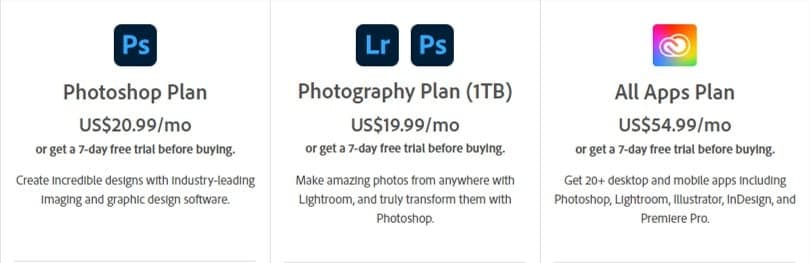
- You can use Firefly for FREE in your web browser by creating an account here.
- Firefly also comes with an Adobe Photoshop subscription at $20.99 USD a month and offers a 7-day free trial.
Benefits
- Time Efficiency: With its advanced generative features Firefly can cut down the time needed to complete tasks.
- Boosts Creativity: Like any good AI tool, Firefly helps catalyze creativity by generating unique images that can really spark your creativity.
- Ease of Use: Firefly's integration into Photoshop has broken down the barrier to entry and made it a more user-friendly tool.
- No Copyright Issues: Firefly ensures users and Adobe are safeguarded against potential copyright infringements.
Drawbacks
- Firefly is still in beta and sometimes generations are unexpected
- Some users found the image generations to be a bit bland compared to other tools
What Are the Best Adobe Firefly Alternatives?
While Firefly is an excellent generative AI tool for images and video, that doesn't mean it's the best solution for everyone.
Here are the top 5 Adobe Firefly Alternatives:
- 1. Midjourney
- 2. Leonardo
- 3. Dall-E 3
- 4. Runway Gen-2
- 5. BlueWillow

1. Midjourney
Midjourney is the most popular image generation tool available right now – and for good reason.
The image quality from Midjourney is simply incredible. Users who are new to generative AI can expect to be amazed at the art generation capabilities of Midjourney, I know I was.
Midjourney can generate basically anything you can think of whether it be ultra-real stock photos, product logos, cartoon characters, or professional food shots. If you can imagine it, Midjourney can do it!

Created using Midjourney v5.1
Another massive benefit of Midjourney is that due to its popularity, there are heaps of online resources to help you craft the best prompts.
Midjourney has also recently added its very own generative fill type function known as Vary (Region), and it's extremely good.
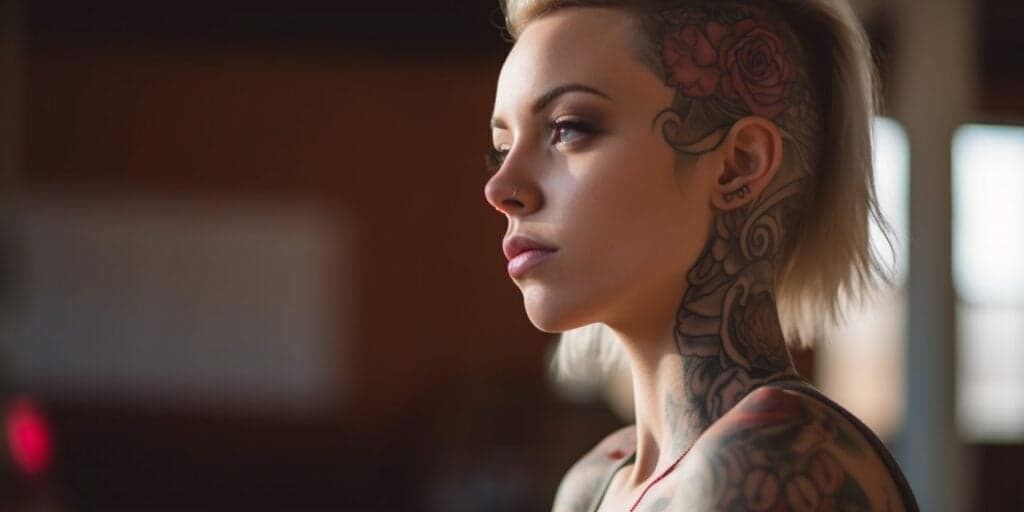
Check out the image below. I generated it with Midjourney, then added a neck tattoo with the Vary (Region) feature. The quality certainly gives Firefly a run for its money.
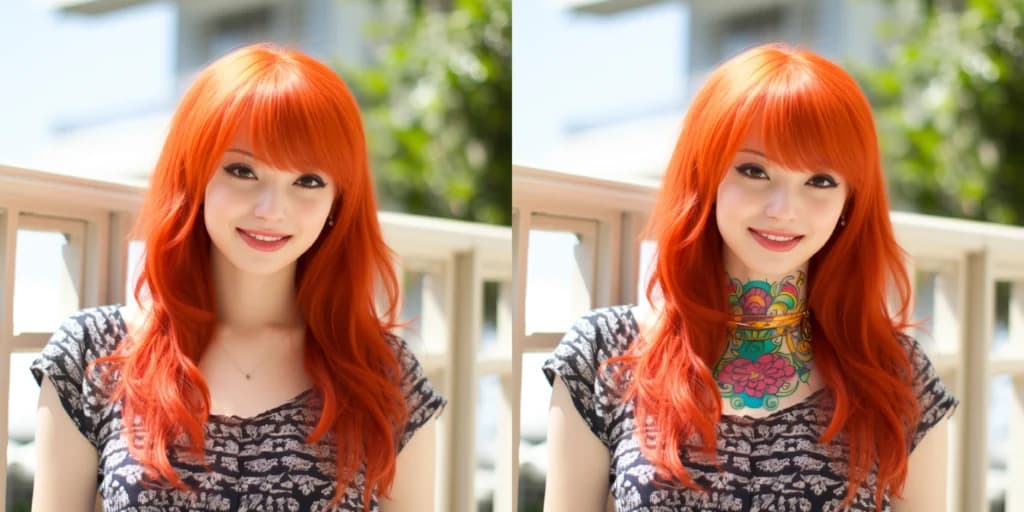
I created this image in Midjourney, and then used the Vary(Region) function to add a neck tattoo to the lady.
Midjourney has all the standard image generation modes like text-to-image, text + image-to-image, image overlaying, and even reverse image prompting which allows you to upload an image and generate a text prompt.
Midjourney is currently available for use within their discord server and has recently launched their Alpha web app, which is accessible by users with more then 5,000 existing Midjourney image generations in Discord.
Given the extremely high-quality images provided by Midjourney, and the recent addition of their own type of generative fill functionality called Vary (Region), It's still the best Adobe Firefly alternative in 2025.
Created using Midjourney v5.1
Key Features
- Image Generation: Midjourney provides a suite of image generation tools including text-to-image, image-to-image, reverse image prompting (describe), and image overlaying functionalities.
- Advanced Control: Midjourney supports a wide array of syntax options allowing you to craft highly customized images to suitable to your needs.
- Generative Fill Alternative: The recent addition of the Vary (Region) function allows you to add and remove items from images with a text prompt.
- Availability: Midjourney is accessible both on desktop platforms and on mobile for Discord users.
Pricing
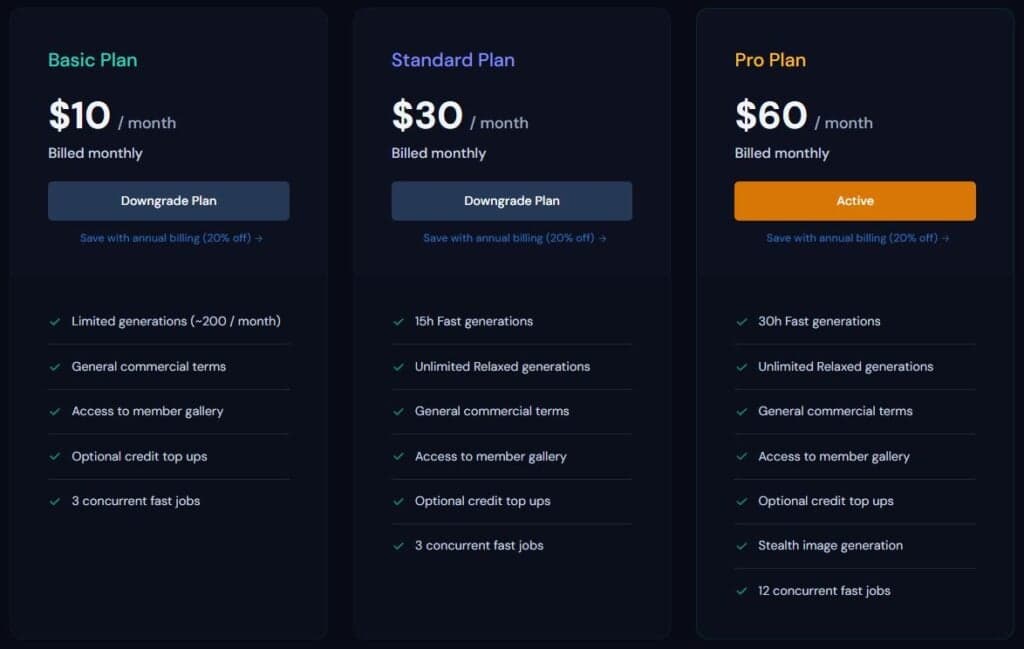
- Free: Unfortunately Midjourney no longer offers a free subscription due to misuse of the tool.
- Basic Plan: $10/Month for limited generations and 3 concurrent jobs.
- Standard Plan: $30/month for 15 hours of fast generations and 3 concurrent jobs.
- Pro Plan: $60/month for 30 hours of fast generations, 12 concurrent jobs, and stealth generations.
- Mega Plan: $120/month for 60 hours of fast generations, 12 concurrent jobs, and stealth generations.
Benefits
- Superior Quality: With a focused approach on image generation, Midjourney produces the highest-quality AI images available.
- Online Resources: The popularity of Midjourney has led to a plethora of easily accessible online resources.
- Accessibility: Being available on both desktop and mobile platforms through Discord, Midjourney ensures you can create AI images anytime, anywhere with a web app coming very soon.
Drawbacks
- Some people have ethical concerns with the images Midjourney was trained on
- No free trial
2. Leonardo
Leonardo provides AI image generation with an impressive range of features and capabilities.
Leonardo's featured models allow you to generate images using a wide range of pre-trained models that can enable faster generated images in your desired styles.
Leonardo supports different types of prompt types for image generation, including text, image prompts, and image-to-image.
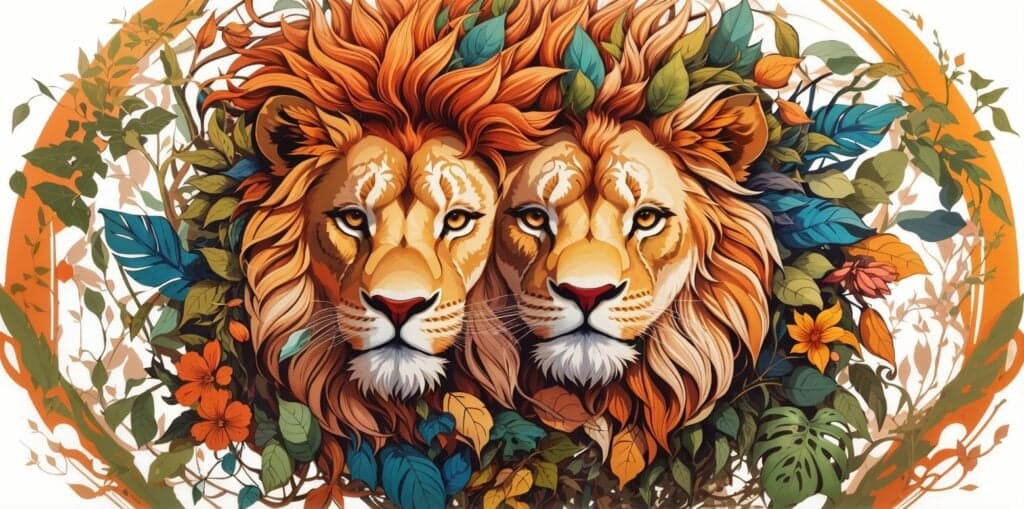
You can leverage Leonardo's Alchemy and Prompt Magic v2 features to create impressive 2D images, like this one. 👇
Once your image generation is complete, Leonardo allows you to refine your creation further with its post-processing features.
Upscaling, unzooming, background removal, and transfer to the Canvas are all options available to you for enhanced control and post processing of your generated images.
Leonardo's canvas feature fully qualifies it as one of the firefly alternatives. Extend, mask, replace, and erase elements indefinitely and effortlessly, and regenerate specific areas to achieve your desired output.
Alongside it's ability to generate images, I was quite impressed with Leonardo's inpaint/outpaint functionality. See below for an example where I removed the glasses from the lady.
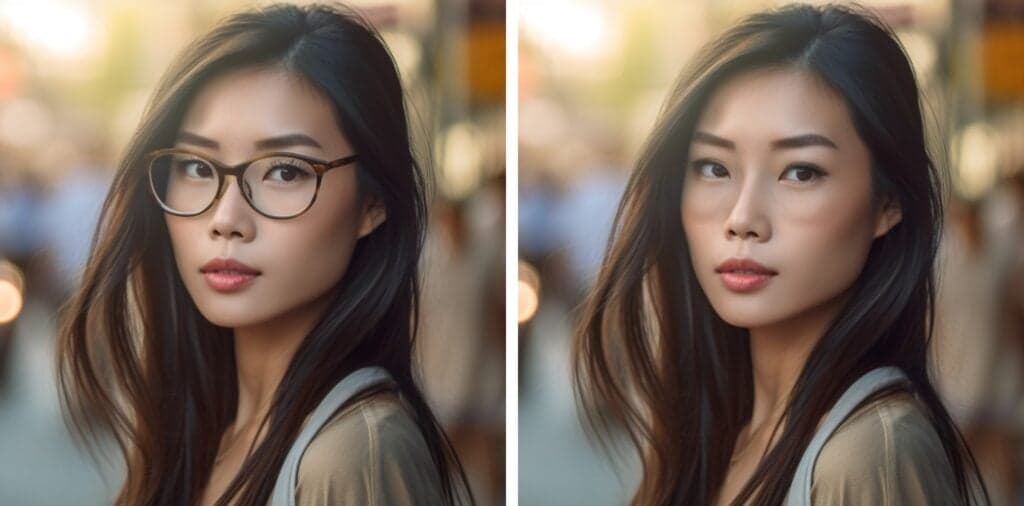
An example I generated to remove the women's glasses using Leonardo's take on generative fill.
Leonardo also features an LLM for automatic prompt generation describing your digital art, which I thought was a neat feature.
The Leonardo AI platform also supports the training of custom AI models with as few as 10 images.
There's also a Texture Generation tab where you can texture 3D models with a simple text prompt. The Fine-tuned Models tab gives you access to other user-trained models to broaden your creative possibilities.
Leonardo is a comprehensive AI art generator that offers a seamless design process and control over your creations, making it a competitive choice in my list of Firefly alternatives in second place.
Key Features
- Diverse Pre-Trained Models: Leonardo offers a range of pre-trained models that you can experiment with to generate various digital art styles quickly.
- Post-Processing Options: Leonardo offers post-processing features such as upscaling, unzooming, background removal, and transfer to Canvas, allowing you to better refine images.
- Generative Canvas: The Canvas feature offers capabilities similar to Adobe's generative fill, including extend, mask, replace, and erase options.
- Custom AI Model Training: You can train custom AI models with as few as 10 images, perfect for creating avatars, headshots, or unique models.
Pricing
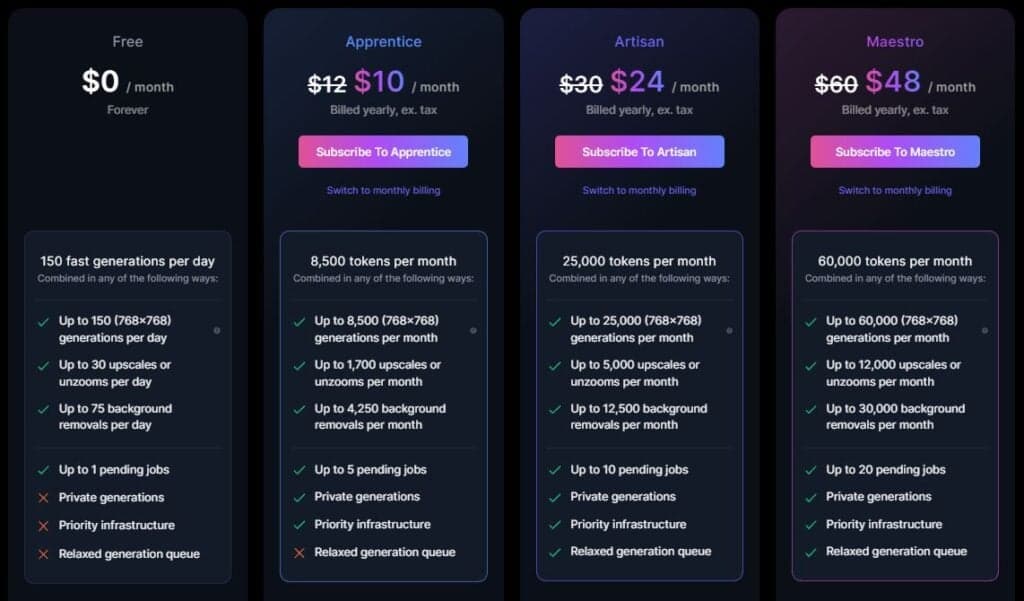
Leonardo offers 4 pricing tiers:
- Free: Allows 150 fast generations per day – enough to get a feel for Leonardo.
- Apprentice: 8,500 tokens per month with private generations at $10/month.
- Aristan: 25,000 tokens per month with full functionality at $24/month.
- Maestro: 60,000 tokens per month with full functionality and up to 50 models at $48/month.
Benefits
- Comprehensive Art: Leonardo's wide range of features and capabilities offer control and flexibility to the user.
- Inpaint/Outpaint Functionality: Leonardo's inpaint/outpaint functionality allows for easy modifications.
- Language Model for Prompts: Automatic prompt generation is possible, adding to the tool's convenience and efficiency.
Drawbacks
- Leonardo can be overwhelming for new users.
3. Dall-E 3
DALL·E 3 is the third release image generation tool from OpenAI – the same company responsible for ChatGPT.
Compared to the other AI image generation tools Dall-E has taken the minimalist approach with very basic functionality – which is perfect for users looking to make simple generations.
OpenAI have recently integrated this new AI image tool into ChatGPT but to use text-to-image, image-to-image, and outpaint functionality you'll need to use the Dall-E web app.
Outpaint qualifies Dall-E on the list of Fifefly alternatives and is currently only available in the web app (not ChatGPT).
To get a fell for Dall-E's outpainting, I took an image of a puppy and used Dall-E to give it a beanie. The results weren't bad!
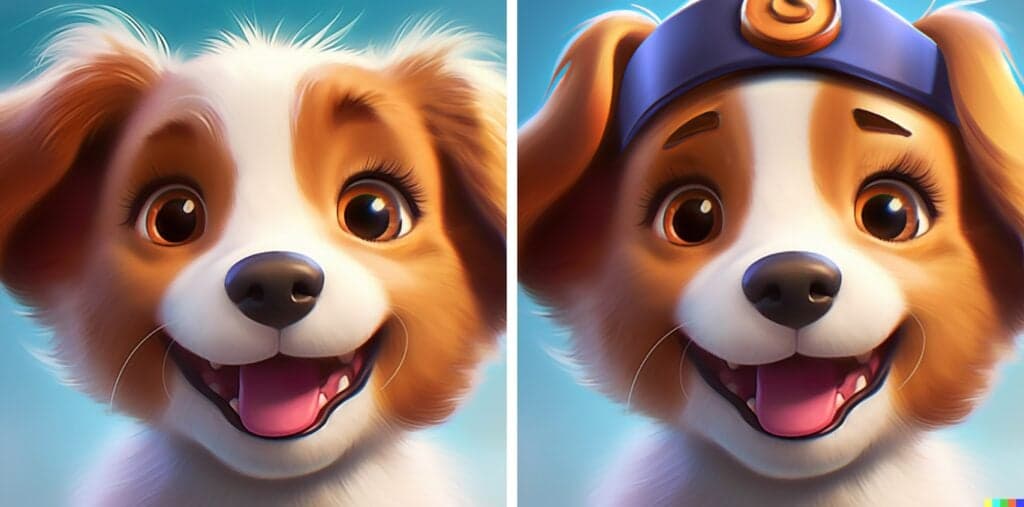
An example of Dall-E's Inpainting functionality with a Midjourney puppy (left) and Dall-E Outpainted 'beanie' (right).
The image quality from Dall-E 3 is already significantly better than what we've seen in Dall-E 2. Check out the two images below where I used the same prompt in Dall-E 2 and Dall-E 3 to compare to difference.

An example of Dall-E 2 Vs. Dall-E 3 puppies!
Another thing I noticed right away with Dall-E 3 was strict restrictions on specific words. For example, I wasn't able to use the word "Disney" in my prompt, assumably due to fears of copyright issues.
Key Features
- Minimalist Design: DALL·E 3 is built right into ChatGPT which makes it incredibly easy to access and use for GPT Plus users.
- Outpaint Functionality: The Outpaint feature allows you to add or modify elements in an image, similar to Firefly's generative fill and is only currently available in the web app Dall-E 2.
- Variation: DALL·E 2 provides a unique variation feature, enabling you to generate a range of closely related variations from a given initial image.
Pricing
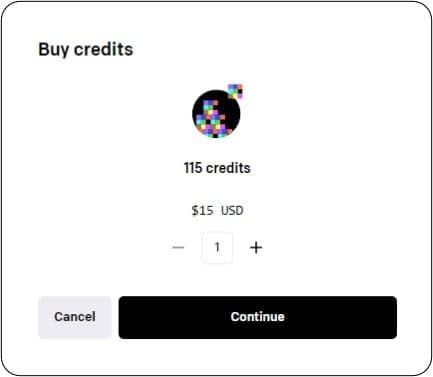
- Dall-E 2 is a pay-as-you-go type model that offers 10 free image generations when you sign up. From here you get 115 credits (which is 115 image generations) for $15.
- Dall-E 3 is built right into ChatGPT and is $20/month for GPT Plus.
Benefits
- Quick Start: Easy access and quick to use for existing ChatGPT Plus users.
- Outpaint Feature: DALL·E 2's Outpaint functionality provides a unique capability that isn't found in all generative AI tools.
Drawbacks
- Dall-E's output just isn't as good as other generative fill-type tools (yet).

4. Runway Gen-2
Runway's Gen-2 is an AI art generator that boasts widest range of capabilities of any of the tools I tried.
Note: Some Runway products are still classed as Gen-1. For the sake of simplicity, I will refer to all Runway tools as 'Gen-2'.
Runway has earned the most notoriety for its generative AI video content capabilities and features a text-to-video tool which allows you to take existing footage and change the style – the clip below shows what you can do with Runway's video-to-video feature.
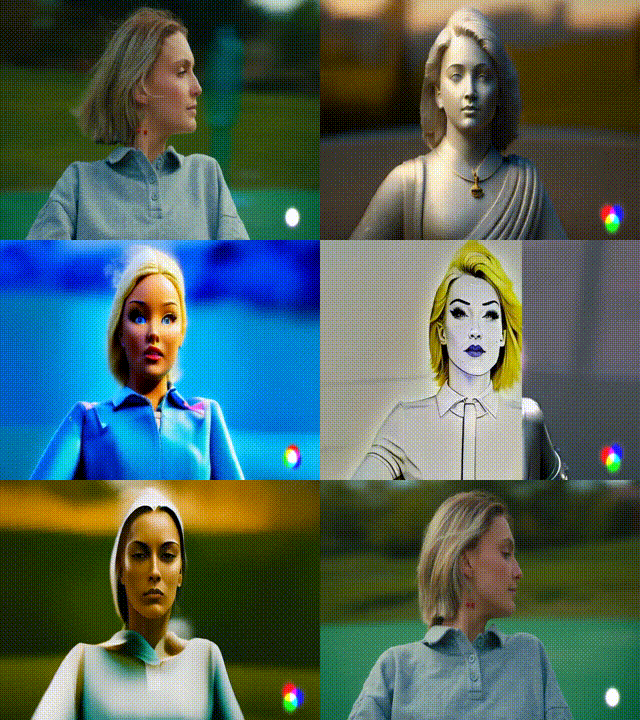
Video-to-video using Runway Gen-1 (GIF: Runway)
Runway's AI video features can do more than just video-to-video as well. Frame interpolation, super slow-motion, face blurring, and motion tracking to name a few.
On top of the video features, Runway is capable of all the usual generative image features like text-to-image and its own version of generative fill, as well as subtitle generation and audio clipping.
The biggest drawback of Runway right now is quality. While it offers the most features, the image quality is low compared to other tools that have focused on one area of generative AI only. As always though, The quality is increasing incredibly fast.
Given the vast multi-modal functionality plus the Erase/Replace feature, Runway's art generation capabilities have earned it fourth place as an Adobe Firefly alternative in 2025.
Key Features
- Erase/Replace: Runway's Erase/Replace feature has similar functionality to Adobe's generative fill.
- Video Capabilities: Runway's Gen-2 is known for its generative AI video features, including text-to-video, video-to-video, frame interpolation, super slow motion, face blurring, and motion tracking.
- Multi-Modal Tools: Gen-2 also supports digital art tasks such as text-to-image, image expansion, color grading, 3D textures, and many more.
- User-Friendly Web App: Runway Gen-2 is designed as a simple and intuitive web app making it simple to get started.
Pricing
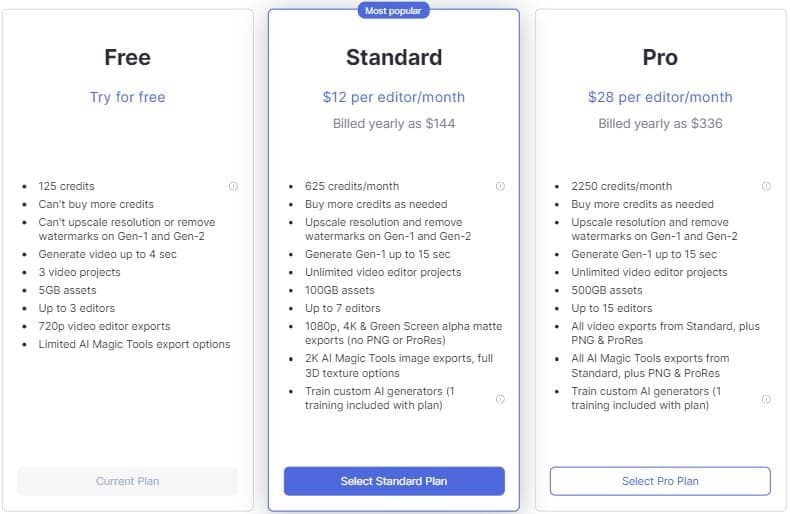
- Free: Runway Gen-2 offers 125 free credits for image and video generation when you make an account. The credits are enough to do a fair few generations and test if you like the product.
- Standard: The standard subscription offers 625 credits per month which is enough for most users for $12/month.
- Pro: The pro plan offers 2250 credits and full Runway functionality at $28/month billed yearly.
Benefits
- Vast Features: Runway Gen-2 outperforms many competitors in terms of breadth of functionality and capability to generate images.
- Leader in AI Video Tools: Runway Gen-2 leads the industry with its unique generative AI video tools.
- Cost Efficiency: With the inclusion of various generative tools under one subscription, Runway provides a cost-effective solution for users needing a range of functionalities.
Drawbacks
- The AI video still has a ways to go before they're at the high standard of other generative tools
- Image-to-image feature lacks quality
5. BlueWillow
BlueWillow is an AI image generation tool that allows you to create digital art within minutes of signing up.
Key features include prompt-based generation, image-to-image, outpainting (zoom out), and negative prompting – which is handy for removing features or styles from your images.
BlueWillow offers a user-friendly interface built right into Discord, and their forthcoming web app is something I'll be keeping an eye on.
Interestingly, BlueWillow were recently bought out by LimeWire.
BlueWillow offers a generous free trial so you can get a feel for the tool before committing to a monthly or yearly plan.
BlueWillow recently surpassed 2 million users and they even have a podcast "The AI Edge" which you can listen to on their Discord!
Key Features
- Prompt-Based Generation: BlueWillow's intuitive prompt system allows you to create logos, graphics, digital artwork, or photo-realistic scenes with simple text input.
- Quick Results: Generate up to four images within a minute of signing up to the BlueWillow Discord.
- Zoom Out Feature: Explore broader contexts with the 'outpainting' feature that enables zooming out generated images.
- Negative Prompting: This unique feature allows the removal of specific styles or features, offering greater control over the final generation.
Pricing
BlueWillow offers 3 pricing tiers and a generous free option.
- FREE: Basic offering generates up to 10 prompts per day, supported by ads, with a queue limit of 5 simultaneous requests.
- Willower: Generate up to 50 prompts per day with a queue limit of 5 simultaneous requests for $5 per month.
- Blue Angel: The most popular tier generates up to 100 prompts per day with a queue limit of 10 simultaneous requests. Also gains you access to live event chats, premium generation channels, and our VIP contest/newsletter for $10/month!
- Sapphire: Grants you up to 200 prompts per day, a queue limit of 10 simultaneous requests, and includes all the perks of the Blue Angel tier for $20/month.
Benefits
- Great Alternative: Recently surpassing 2 million users, BlueWillow offers compelling features as a direct competitor to Adobe Firefly at a competitive price.
- Community Engagement: With a dedicated team and a user-friendly Discord community, users can access reliable support and secure solutions.
- Free Access: BlueWillow has a generous free plan that allows you to get a feel for the product before committing.
Drawbacks
- BlueWillow lacks private generation so if the channel is busy it can be fiddly to track your images down.
Who Should Use Adobe Firefly Alternatives?
Generative AI image and video tools can be used by creatives looking to come up with ideas and spark creativity, businesses looking to save time and money on image or logo generation, Freelancers looking to sell their creations, researchers looking to quickly and easily visualize concepts for their audience, teachers can use them to create custom learning materials, entertainers can create realistic environments and characters, the possibilities are endless.
The best part about these tools is how easily accessible and user-friendly most of them are. With just a few clicks of your mouse, you can be using cutting-edge technology and seriously level up your productivity and creativity.
Wrapping Up
Adobe Firefly has recently brought more attention to the generative AI space with its high-quality generative fill feature.
As you can see in the examples I provided in this article, the tools each have unique strengths and weaknesses that can compete with Firefly.
Midjourney is my choice for the best Firefly alternative due to the extremely high quality outputs and versatility of it's Vary(region) functionality. Runway was a close second.

#1 Midjourney 🥇
Midjourney is the best AI image generation tool currently available allowing you to generate the widest range and the highest quality images. The recent addition of the Vary Region feature makes Midjourney the best Firefly alternative.