I remember spending hours trying to write the perfect script for the YouTube shorts I was working on, only to speak a few words and realize it didn’t make sense! (Seriously that actually happened a few times 😭).
Using an AI script generator I could check my YouTube video scripts made sense before I tried to record them. What’s more, I used the AI script writer to help me brainstorm, and write the script from scratch too!
In this guide, you’ll find the 10 best AI script generators to help you produce the best writing ever.

#1 Claude
Claude from Anthropic is a powerful AI script generator, writer, and all round content helper, with the most natural-sounding output I’ve tested.

#2 ChatGPT
ChatGPT from OpenAI is highly capable of various writing tasks including AI script generation, and it’s my favorite for brainstorming.

#3 Maekersuite
Maekersuite is an AI content creation tool that allows creators to script, research, and analyze at a professional level.

#4 Invideo
Invideo is an AI script writer for YouTube scripts and stories with an intuitive interface, and it can turn your script into a finished video too.

#5 Writesonic
Writesonic was my original #1 script writer. It has since pivoted to AI search visibility, but its Chatsonic assistant can still write your scripts.
What Are the 10 Best AI Script Generators?
My pick of the best AI script generators is Claude, followed by ChatGPT, with Maekersuite, Invideo and Writesonic rounding out the top five.
There’s absolutely no shortage of AI script generators to choose from now that large language models are so easy to build on.
Knowing this, I tried out a bunch of the most popular tools in an attempt to find the best AI script generator available on the market. (Gemini and vidIQ are newer additions to this list, so for those two I’ve stuck to the facts rather than hands-on testing.)
As I compiled my reviews in an attempt to find the best AI script writer, I considered the following factors:
- Quality: Is the writing well-structured and of a high standard? Does the AI tool follow your prompts appropriately?
- Originality: Does the tool offer an unique features or is it another ChatGPT rip-off?
- Creativity: Does the script generator help with creativity? Does it come up with unique, entertaining, and original ideas?
- Customization: Can you customize the output and change things such as the tone and perspective of the AI script writer?
- Usability: Is it user-friendly? How quickly can you get going?
- Price: Is it affordable? Is it good value for money?
- Free Trial: Does it have a free trial so you can try it before you buy?
Here’s the TLDR;
The 10 best AI script generators for YouTube are:
- 1. Claude
- 2. ChatGPT
- 3. Maekersuite
- 4. Invideo
- 5. Writesonic
- 6. Gemini
- 7. vidIQ
- 8. Jasper
- 9. Syllaby
- 10. Rytr
1. Claude

Claude is Anthropic’s AI assistant, and it’s one of the best AI script generators available.
Similar to ChatGPT, Claude is a no frills AI tool that allows you to prompt the AI, and get a response.
What separates Claude from other tools is the high quality conversational output. While some of the other tools can sound a bit robotic and use language that actual people probably wouldn’t use, Claude’s output sounds like real conversation.
When I first tested it, Claude was only available in the US and the UK. These days it’s available in far more countries, on the web, desktop and mobile.
My personal favorite feature of Claude is the fact you can upload entire documents in your prompt. This is a great way to train the AI on your YouTube script writing style and get way better results. Projects take this a step further: keep your past scripts and channel notes in one project, and every new chat in it already has your style to work from.
To sum up, Claude is a powerful tool and the most natural-sounding writer of the bunch, landing it in first place as the best AI script writer for YouTube.
Key Features
- High-Quality Output: Claude’s conversational output closely mimics human speech, offering a more natural output.
- Document Upload: The tool allows users to upload entire documents as a prompt, making it much easier to train the AI on your writing style.
- Projects: Keep your scripts, notes and style guide together so Claude can reference them in every chat.
- Ease of Use: Claude’s straightforward interface enables quick prompting and fast results.
Pricing
- Free: Chat on the web, desktop and mobile using Claude’s Sonnet and Haiku models, with up to 5 Projects.
- Pro: $20 a month, or $17 a month billed yearly, with more usage and access to Claude’s Opus model.
- Max: From $100 a month for 5x or 20x Pro’s usage.
Benefits
- Conversational AI: Claude excels at giving realistic human like outputs meaning you’ll spend less time editing
- Model Training: The ability to upload entire documents makes it easy to train to AI on your writing style.
Drawbacks
- Limited Use: The free plan is limited and there are limits even on the paid plan! (although they’re hard to hit)
2. ChatGPT

If you’re new to the world of natural language processing tools, OpenAI’s ChatGPT has set the standard for the best all-around language tool. (When I first tested it, it ran on GPT-4. ChatGPT has since moved on to OpenAI’s newer GPT models.)
Not only is ChatGPT superior to most AI script generators with its versatility, but it can also act as a full-time AI writing assistant, making the writing process easier than ever.
ChatGPT is my personal favorite for generating lists and having brainstorming sessions with. When prompted right, it has some really original and creative ideas.
It’s also grown well beyond text. ChatGPT can now search the web and generate images, which is handy for researching a video and mocking up thumbnail ideas.
Overall, ChatGPT is affordable and highly capable of being your own personal AI script generator. It can help with the writing process and script generation, heck, it can even do it for you! ChatGPT gets second place as the best AI script writer.
Key Features
- Versatility: ChatGPT excels in various tasks, from generating story ideas to brainstorming creative ideas and of course generating YouTube scripts.
- Affordability: Plus costs $20 a month, and there’s a cheaper Go plan at $8 a month in the US.
- Free Version: ChatGPT’s free plan is plenty to get started, with usage limits.
Pricing
- Free: $0, with usage limits.
- Go: $8 a month in the US.
- Plus: $20 a month.
- Pro: $100 or $200 a month for much higher usage.
Benefits
- Quick Start: The platform is user-friendly, enabling users to start generating a video script immediately after signing up.
- Multi-Use Tool: ChatGPT can serve as a full-time writing assistant, easing the writing process.
- Large Community: With more than 800 million weekly users as of October 2025, extensive peer support and resources are available.
Drawbacks
- Prompt Skill: Crafting effective prompts can require some skill and practice.
- Long Content: Really long scripts can still take a few rounds of prompting to keep the structure tight.
3. Maekersuite

Maekersuite is an AI video content creation tool that allows creators to script, research and analyse video content like professionals without needing big teams and resources.
The script generator allows you to guide and edit the AI output at every stage: from the initial brief to the outline and the final script.
Maekersuite enables the creation of quick and easy scripts, while also catering to those who prioritize quality and wish to have more control over the creative scriptwriting process. In the script editor, you can use the built-in AI (choose your own model) to assist with any aspect in a familiar chat format.
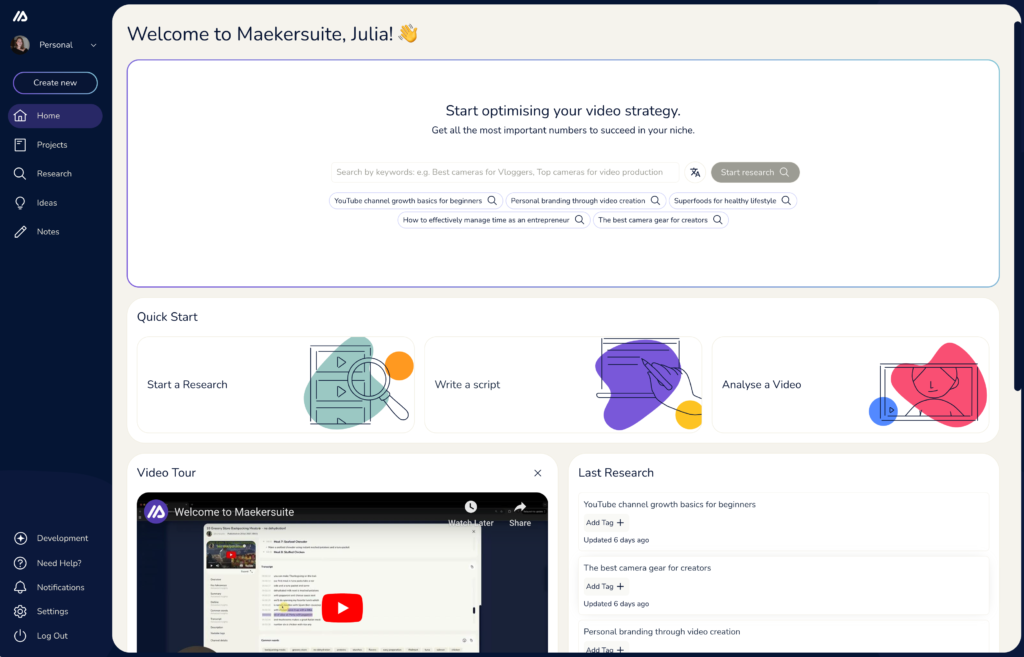
Designed specifically for video content creators, Maekersuite slips seamlessly into your video production workflow.
But Maekersuite offers more than just script generation. It also includes powerful video research and analysis features to support your content creation journey.
These combined features, tailored for video creators, can save you hours of time.
Key features
- Quality Content: The AI is fine-tuned for scripts and delivers high quality content that can be used without edits if needed.
- Quick start: No extensive setup needed, just dive into your first topic and get to your first video script in minutes.
- Unlimited video ideas: Never run out of video ideas, as all plans include unlimited video ideas generation.
- Research functionality: Thorough research for your niche or specific video to set your projects up for success.
- User-Friendly: A clear interface built for your specific use case – video script writing.
Pricing
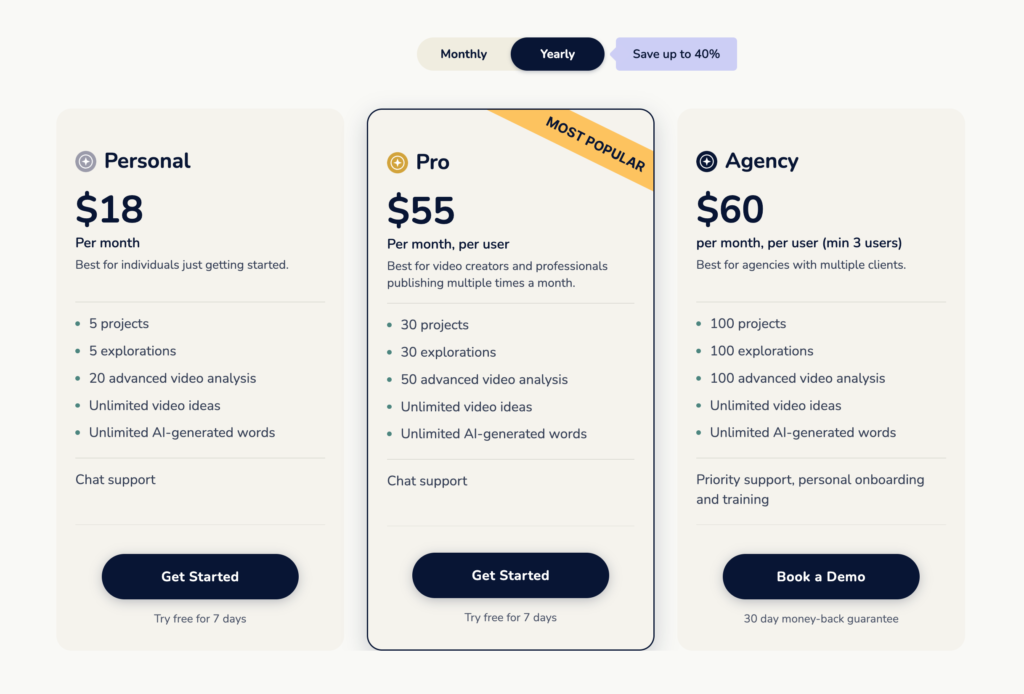
- Free 7-day trial on the Personal and Pro plans.
- Personal: $23 a month, or $18 a month billed yearly, if you are just getting started.
- Pro: $79 per user a month, or $55 billed yearly, for video creators and professionals publishing multiple times a month.
- Agency: $99 per user a month, or $60 billed yearly (minimum 3 users), for agencies with multiple clients.
Benefits
- Better Scripts: Storytelling focus creates scripts that are engaging for the viewers.
- Data-driven: Your scripts are created based on the learnings from the top performing videos already online.
- Save Time: Maekersuite can do the groundwork for you to be able to focus on the things that make your videos pop.
- Content Management: Great content management opportunities including scheduling and timeline views.
Drawbacks
- Not directly linked to any video editor so you’ll need to have external software for that
4. Invideo

Invideo’s AI script generator is a real game-changer for video creators like you and me. It uses artificial intelligence to do the heavy lifting when it comes to writing scripts for our videos.
What’s cool is that it doesn’t just spit out any old script – it creates scripts that grab your audience’s attention right from the start, delivers messages in a clear and organized way, and encourages viewers to take action.
But wait, there’s more! It doesn’t stop at scriptwriting. This nifty tool also takes those scripts and magically turns them into polished, ready-to-publish videos.
Key Features
- AI-Driven Video Creation: Enter any topic, and Invideo AI generates a script, creates scenes, adds voice overs, and tweaks the video at your command. It’s designed to make engaging your audience effortlessly simple.
- AI Video Models and Stock Media: It plugs in third-party video models like Google’s Veo 3.1 and Kling, alongside a stock media library, to fill out your scenes.
- Customization with Text Commands: Make big or small changes to the generated video with simple text commands, offering a level of customization akin to having a personal video editor.
- Complete Editing Control: Beyond AI generation, you have the option to change the script and media with an easy interface, plus a fully-powered video editor to make the video uniquely yours.
Pricing
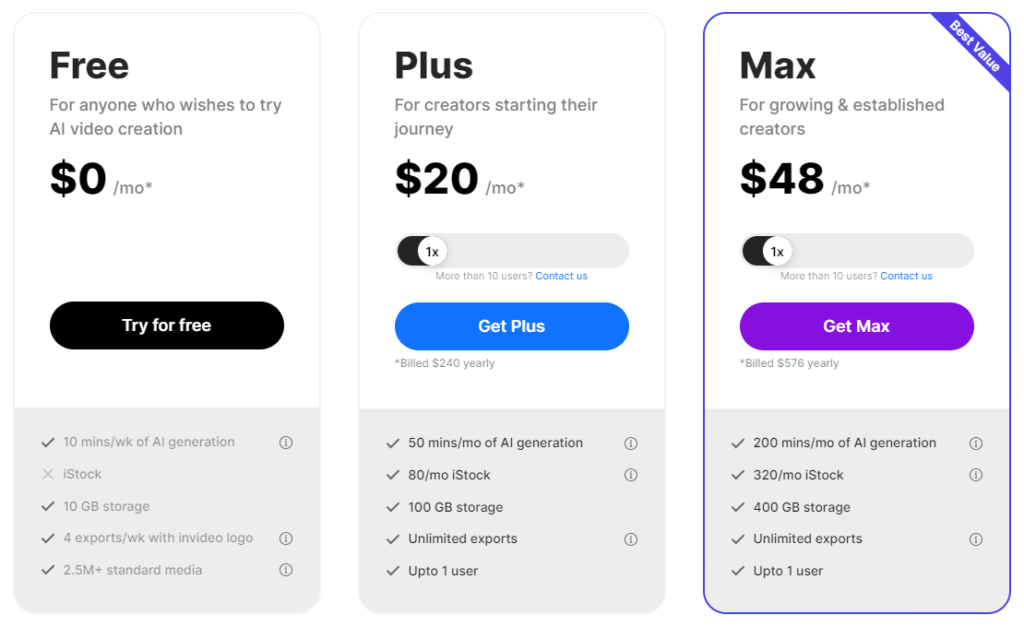
Invideo AI’s plans now run on credits and are priced per seat:
- Starter: $20 a month, or $10 a month billed yearly.
- Plus: $60 a month, or $30 a month billed yearly.
- Max: $150 a month, or $75 a month billed yearly.
The screenshot below shows Invideo’s older plans, so the prices in it are out of date.
Benefits
- Time-Saving: Automated script and scene generation streamline the video creation process.
- Ease of Use: User-friendly interface and simple text commands make video editing accessible for all skill levels.
- Cost-Effective: Invideo can be more cost-effective than hiring a professional video editor or production team, making it a great option for small businesses or individuals on a budget.
Drawbacks
- Credits: Everything runs on monthly credits that don’t roll over, and AI video generation can chew through them fast.
5. Writesonic

Writesonic was my number one AI script generator when I first tested these tools, helping me generate high-quality video scripts with minimal effort.
Its video scripts were well-structured, the writing style was natural and engaging, and the app was easy to work in when tweaking your content.
Writesonic really shone when it came to coming up with unique, and believe it or not – original ideas for your video script. The outline and intro suggestions helped spark the creative process, and the paragraph expander was great when you needed to add some extra meat to your content.
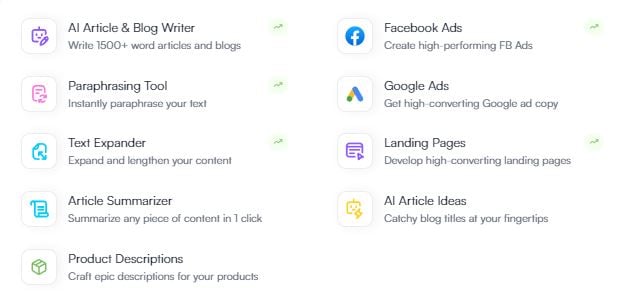
Writesonic’s dashboard looks very different now, and here’s why.
Writesonic has since pivoted. It now calls itself an AI search growth engine: it tracks how brands show up in answers from ChatGPT, Gemini and Google’s AI Overviews, then helps fix the gaps. Its Chatsonic chat assistant (which has a free plan) can still write your scripts, but the main platform starts at $79 a month billed yearly and is built for marketing teams rather than solo YouTubers.
That’s why it’s slipped from first to fifth on this list. If you’re a creator who also wants your brand showing up in AI search results, it’s still well worth a look.
Key Features
- AI Search Visibility: Tracks how your brand shows up in answers from AI platforms like ChatGPT, Gemini and Google’s AI Overviews.
- Chatsonic: A chat assistant for scripts, social posts and other copy, with a free plan.
- AI Article Writer: Plans include a monthly allowance of SEO articles.
- Content Customization: When I tested it, Writesonic gave impressive control over tone, perspective, and keywords, so you could really make the content your own.
Pricing
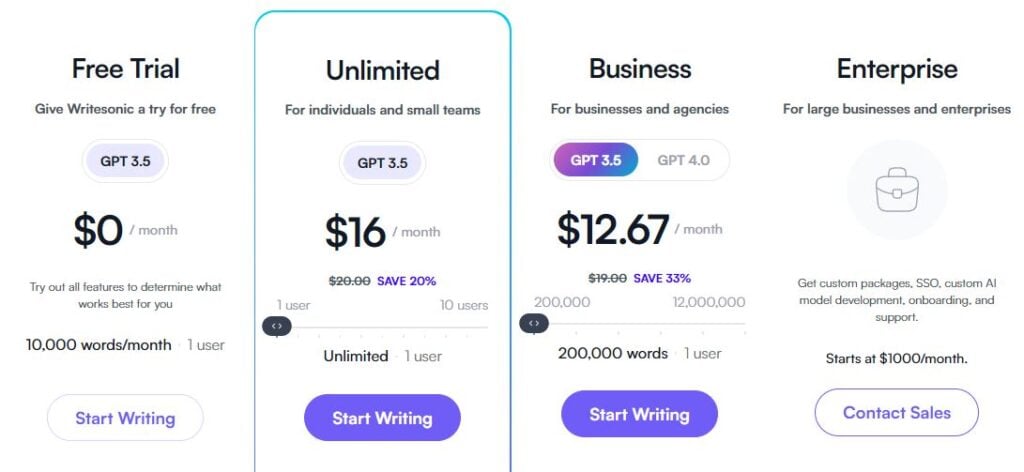
That screenshot shows Writesonic’s old pricing. These days there’s no free plan for the main platform, just a free trial:
- Starter: $79 a month billed yearly.
- Basic: $199 a month billed yearly.
- Growth: $399 a month billed yearly.
- Enterprise: Custom pricing.
Benefits
- Better Scripts: You might be surprised how much better your writing gets when adding an AI script writer to the process.
- Increased Productivity: Writesonic crushes writer’s block meaning you get more work done faster!
- AI Search Extras: Handy if you also want your channel or brand to show up in AI answers.
Drawbacks
- Writesonic output can get repetitive at times without the proper prompting.
- Price: At $79+ a month, the main platform is overkill if all you need is scripts.

#5 Writesonic
Writesonic was my original favorite AI tool for generating video scripts for your YouTube video. It’s still a capable writer, but these days it’s best suited to marketers who also care about AI search.
6. Gemini
Gemini is Google’s AI assistant, and it works a lot like Claude and ChatGPT: describe your video, audience and length, and it’ll outline and draft the script, then rewrite it as many times as you like.
The free plan is generous. You get Google’s fast Flash model with limited access to its more powerful Pro model, plus image generation and Deep Research, which digs through the web on a topic before you start writing. You can also set up a Gem, a custom version of Gemini that remembers your channel’s style and instructions.
If you’re on YouTube, also try Ask Studio, the AI assistant built into YouTube Studio. It brainstorms video ideas from your own channel data and gives feedback on scripts you paste in. It’s available to most creators, on desktop only.
Key Features
- Free and Capable: The free plan is enough to write and rework full scripts.
- Deep Research: Handy for fact-heavy videos where you need to get the details right.
- Gems: Save your style and instructions so you don’t have to repeat them every time.
Pricing
- Free: $0 with a Google account.
- Google AI Pro: $19.99 a month in the US, with 4x the free plan’s usage, more Pro model access and 5 TB of storage.
- Higher tiers are available for heavy users.
Drawbacks
- Usage Limits: The free plan only gives limited access to Gemini’s better Pro model.
7. vidIQ
vidIQ is a long-running YouTube growth tool, and its AI Script Generator is built specifically for YouTube videos.
Type in your idea and it writes a full script with an intro, talking points, transitions and a closing call to action. You can then adjust the tone or pacing with one click, or reshape any section with a plain-English prompt.
The best bit is that free vidIQ accounts can generate full scripts, while the paid plans add AI thumbnails, unlimited trend research, and an AI coach that gives growth tips based on your channel.
Key Features
- Built for YouTube: Scripts come structured for video, with a hook, talking points and a call to action.
- One-Click Tweaks: Change tone and pacing without rewriting your prompt.
- Channel Tools: Keyword ideas, trends and an AI coach sit alongside the script writer.
Pricing
- Free: $0, with 150 AI credits a month.
- Boost: $16.58 a month billed yearly.
- Max: $39 a month billed yearly.
Drawbacks
- Credits: Heavier AI use eats into your monthly credits, so the free plan only goes so far.
8. Jasper AI

Jasper AI is an AI content creation tool that allows creators to write compelling stories and generate scripts for YouTube videos with ease.
Jasper AI outputs good-quality video scripts that you can craft and adjust to suit your style and storyline.
The language sounds natural and the scripts have excellent structure. And if the initial output from Jasper isn’t perfect you can easily fine-tune the drafts with the editor.
One of Jasper AI’s biggest strengths is its creative brainstorming features. The AI can suggest titles, headlines, outlines, and more to spark ideas. This helps you to beat writer’s block and come up with unique angles.
This is great for anyone stuck on the script for their YouTube video as the AI tool gets your creative juices flowing and trust me the ideas will start to flow.
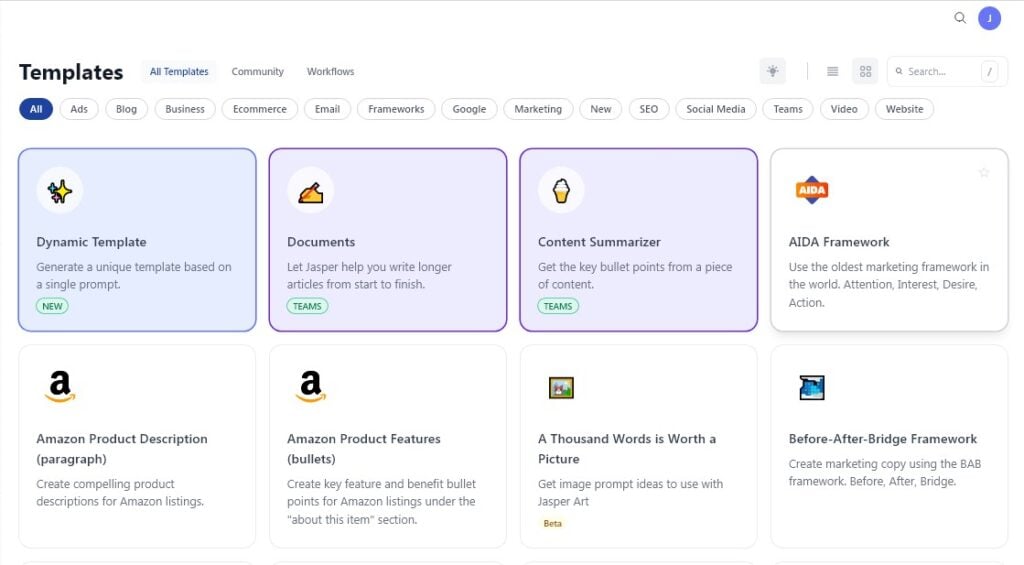
Jasper’s interface has changed since this screenshot, with most of the old templates replaced by marketing “agents”.
Jasper’s customization options allow you to adjust tone, perspective, target keywords, and other parameters, and its Brand Voices and Audiences help keep everything on-brand.
You’ll notice pretty quickly that Jasper aims for maximum ease of use. The interface is intuitive enough for everyone, though Jasper is now aimed squarely at marketing teams, and the price reflects that.
Jasper AI is a robust AI script generator perfect for your next YouTube video or creative writing project. The natural-sounding output and enjoyable user experience make it a solid pick, though at $59 to $69 a month it’s priced for marketing teams more than solo creators.
Key Features
- Quality Content: Can easily generate a video script and output well-written, structured content following your prompts and instructions.
- Better Brainstorming: Offers title suggestions, headlines, outlines, and more to spark ideas and originality faster.
- Content Customization: Allows adjustment of tone, perspective, and target keywords so you can make your voice sound through in the AI.
- Intuitive Interface: Designed with ease of use in mind, with agents for common marketing workflows.
Pricing
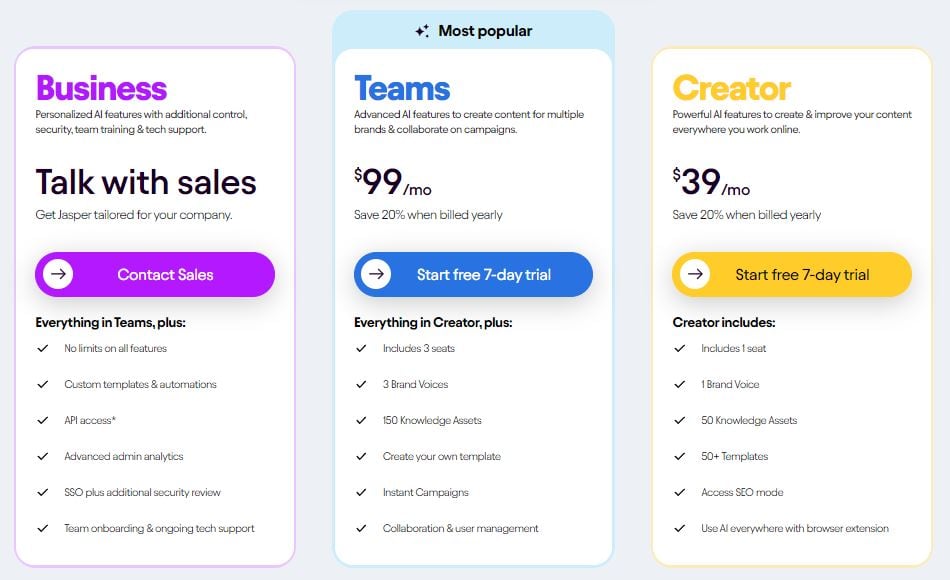
Jasper’s plans have changed since that screenshot:
- Pro: $69 per seat a month, or $59 a month billed yearly, with a 7-day free trial.
- Business: Custom pricing for bigger teams.
Benefits
- Efficient Writing: By offering brainstorming features and customization, Jasper helps beat writer’s block and quickly generate compelling scripts.
- On-Brand Output: Brand Voices and Audiences help keep every script sounding like you.
Drawbacks
- When first using Jasper it can be easy to get overwhelmed with choice!
- No Free Plan: There’s a 7-day free trial, but no free plan.
9. Syllaby

Syllaby started out as a purpose-built AI script generator that allows the user to generate scripts of varying lengths, tones, and styles. It has since grown into a full faceless video tool that writes the script, turns it into a faceless or avatar video, and schedules it to your socials.
Syllaby’s user interface makes a user-friendly tool available to write scripts and generate high-quality content.
Similar to other AI script writers, using Syllaby’s machine-learning algorithms to generate scripts in just a few minutes is straightforward.
When I tested it, you entered your topic of interest and selected one of ten Search Engine Optimized (SEO) topics provided by Syllaby. Syllaby then generated a script outline that you could modify.
Following this, you could select the script length, tone (upbeat, professional, etc), and style (tutorial, testimonial, etc), and that was it!
Syllaby is easy to use and produces quality content, and these days it leans heavily into AI video, trending ideas, and scheduling.
Key Features
- Purpose-Built: Syllaby is specifically designed for generating scripts and short-form video, meeting the demands of specialized content creation.
- User-Friendly UI: Its interface is tailored for ease of use, facilitating high-quality content generation.
- Trending Ideas: Suggests trending topics to build your scripts around.
- Customizability: Allows users to adjust script length, tone, and style for diverse requirements.
- AI Video: Turns scripts into faceless or avatar videos, with voice cloning on the Basic plan and up.
- Scheduling: Bulk scheduling and a content calendar for your socials.
Pricing

Syllaby’s pricing has changed since that screenshot, and according to its FAQ there’s no free trial:
- Starter: $9 a month.
- Basic: $29 a month, or $296 billed yearly.
- Standard: $78 a month, or $796 billed yearly.
- Premium: $153 a month, or $1,561 billed yearly.
Benefits
- Efficient Content: Uses advanced machine learning and natural language processing to quickly generate content.
- Ease of Use: Designed to be user-friendly, making it accessible even for those unfamiliar with AI writers.
- Content Planning: Includes a content calendar feature to aid in organizing and scheduling.
- Trend Spotting: Suggests trending ideas, so you’re not guessing what to make next.
- Multi-Media: Beyond writing stories, it can also generate audio and video content, offering a multimedia approach.
Drawbacks
- Inconsistent Video: The AI video generator feature has shown inconsistency in performance.
- Limited Versatility: Does not offer as wide a range of functionalities compared to other artificial intelligence tools in the market.
10. Rytr

Rytr is an AI natural language processing tool that can be used to generate captivating stories and scripts in moments.
Rytr is one of the AI writing tools that has basic functionality, which allows the user to get into content creation with no distractions.
Rytr allows you to easily create a number of variants, and adjust creativity levels of the output, and it can generate images too.
The free plan gives you 10,000 characters a month, which is enough for a few short scripts. Rytr isn’t my first choice as one of the best AI script writers, but it’s still a quality tool for generating high-quality scripts.
Key Features
- User Simplicity: Rytr is one of the more basic AI script generators with an easy-to-use interface designed for straightforward content creation.
- Variant Generation: The tool enables users to produce multiple variants and adjust creativity levels of their stories and scripts.
- Image Generation: Rytr can create images as well as text.
- Content Saving: Rytr saves all your generated content for future reference.
- Free Plan: A free plan with 10,000 characters a month.
Pricing
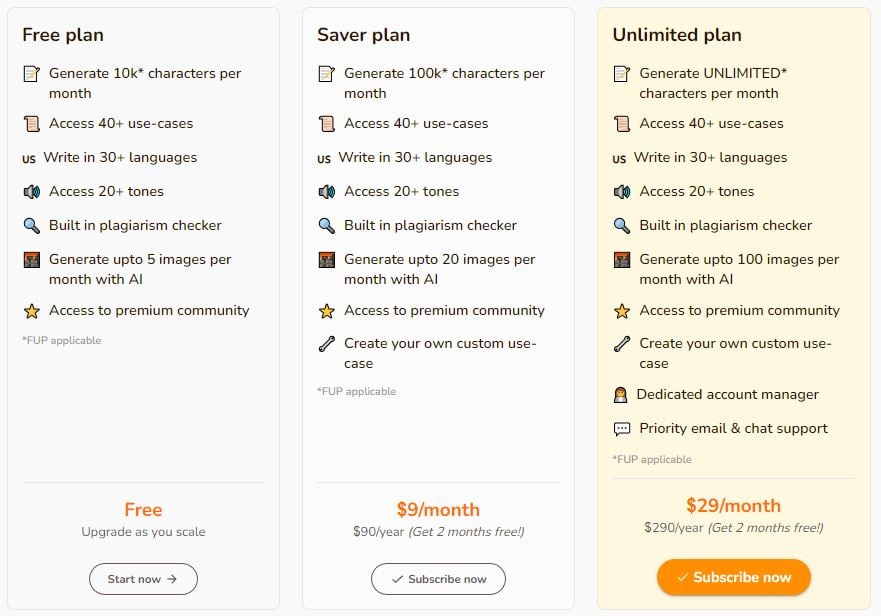
Rytr has a free plan, an Unlimited plan at $9 a month and a Premium plan at $29 a month, or $90 and $290 if you pay yearly.
Benefits
- Quick Setup: With Rytr, it’s easy and fast to get started in content writing or the scriptwriting process.
- Affordability: The free version might be sufficient for some users, and additional plans are economically priced.
- Captivating Content: The AI writer excels in generating captivating stories and high-quality scripts.
- Versatility: Rytr isn’t just for text; it also has content generator tools for image creation.
Drawbacks
- Limited Features: The tool lacks some of the advanced functionalities found in competing AI writing tools.
Wrapping Up
Today we checked out 10 of the best AI script generators on the market.
Claude takes the win as the best all-round AI script writer thanks to its natural, human-sounding output and how easy it is to teach it your style.
ChatGPT is a close second, especially for brainstorming, and if you want a tool built around YouTube video, Maekersuite, Invideo and vidIQ are all worth a look.