Voice cloning technology allows every day people like you and me to replicate a person’s voice with nothing but a minute or two of audio and an internet connection.
This amazing feat is made possible with the advent of artificial intelligence and deep learning techniques.
In this guide, I’ll show you the easiest way to clone your own voice, or someone else’s with their permission, using ElevenLabs’ AI voice cloning technology.
How to Clone Someone’s Voice with AI?
To clone a voice with ElevenLabs, get the person’s permission, sign up for a paid plan, upload a minute or two of clean audio, create an Instant Voice Clone, and you’re done!
1. Sign up to ElevenLabs
This step is obviously pretty straight forward, but you’ll need to sign up!
ElevenLabs does offer a limited free plan, but due to the potential impacts of voice cloning technology, you’ll need to start a paid plan to get started with voice cloning software.
Instant Voice Cloning starts on the Starter plan at $6 a month, which also gets you 30,000 credits and a commercial license.
If you want the full rundown before you sign up, here’s my ElevenLabs review.
2. Get Your Audio for Cloning
The ElevenLabs AI software is so good you can get away with very short clips (ElevenLabs says its new Eleven v4 model can build an instant clone from 10 seconds). BUT, for the most accurate voice clone, ElevenLabs recommends one to two minutes of high-quality audio. Don’t go past three minutes; more audio adds little and can make the clone worse.
Make sure there’s only one speaker, with no background noise, music or echo, because the clone copies everything it hears, breathing and room sound included. ElevenLabs suggests MP3 at 192kbps or better; WAV files won’t usually sound any better.
Record in the style you want the clone to speak in, and keep it consistent. If the sample is a calm narration, that’s what you’ll get back.
For creators looking for generic AI voices for YouTube content, ElevenLabs’ Voice Library has 10,000+ ready-made voices too!
3. Setup Your Voice Clone
Once you have your audio recordings, the AI voice cloning process can begin. ElevenLabs uses a machine learning model to analyze the speech patterns of the provided voice recordings.
Simply head to Voices in the left-hand menu and click the + (Create voice) button.
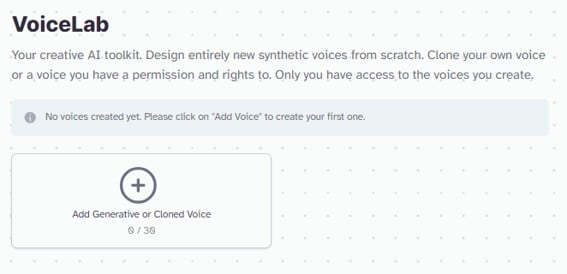
VoiceLab has since been renamed and the screens look different now, but the steps are the same.
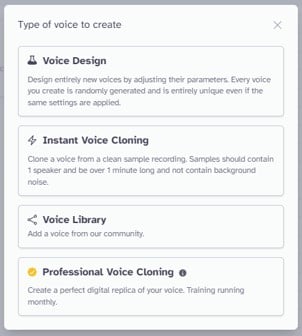
Next, you’ll be prompted to choose what kind of voice to create:
-
Voice Design: Voice design is an AI voice synthesis tool that allows you to create a custom voice from scratch by describing it in a text prompt. Voice design is perfect for faceless social media channels looking for unique narration of their content.
-
Instant Voice Cloning: This is exactly what we’re after. Instant voice cloning is the fastest and simplest way to clone a voice in seconds.
-
Voice Library: Use a custom human voice from ElevenLabs’ library of 10,000+ voices, many of them shared by the community.
-
Professional Voice Cloning: Trains a dedicated model on at least 30 minutes of audio (ElevenLabs recommends one to three hours) for a near-perfect replica. It’s on the Creator plan and up, takes a few hours to train, and only works on your own voice: you verify it by reading lines aloud, and even with someone’s permission you can’t make a Professional clone of their voice.
Choose “Instant Voice Clone” from the menu.
4. Add Your Voice
In the next menu you can upload your audio recordings for voice cloning, or you can simply record audio on the spot.
Add labels to your clone and a description so you can use it later on down the track if need be!
And finally, tick the box confirming you have the right and consent to clone the voice, then click Save voice. Don’t treat that box as a formality: cloning someone’s voice without permission can land you in legal trouble (more on that below). ElevenLabs also blocks cloning of celebrity and other high-risk voices.
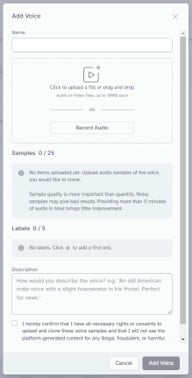
You’ve just learned how to clone your voice in 4 easy steps with ElevenLabs. 🙂
Using Your Voice Clone in ElevenLabs
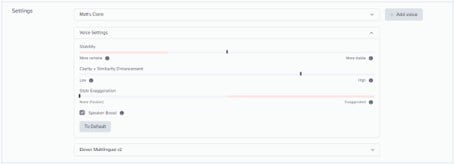
Once you have successfully cloned your voice by following the steps above, find it under Voices > My Voices, click Use voice, and you can start creating dialog in the Text to Speech screen (it was called Speech Synthesis in this screenshot).
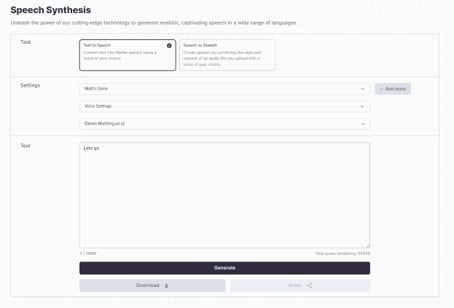
In the voice settings, you can adjust the following to improve your dialog:
-
Stability: More variable will animate your speech patterns more, but reduce the consistency between generations. More stable will increase the consistency between generations, but may sound slightly monotone.
-
Similarity: How closely the output sticks to the original voice (it used to be called Clarity + Similarity Enhancement). If you find your voice generations are getting some strange background noises, try reducing this setting until they are gone.
-
Style Exaggeration: Allows for an exaggeration on the uploaded speech sample. Increasing the exaggeration will also increase the generation time and likelihood of random samples in the speech. ElevenLabs recommends leaving it at 0.
-
Speaker Boost: Improves the quality and accuracy of your speech at the cost of slightly higher generation times.
-
Speed: Speeds up or slows down the delivery, from 0.7x to 1.2x.
Heads up: the newest Eleven v4 models only use Stability and Similarity. Instead of sliders, you steer the delivery with audio tags like [whispers] or [laughs] in your script.
Next, you can choose which ElevenLabs model to use:
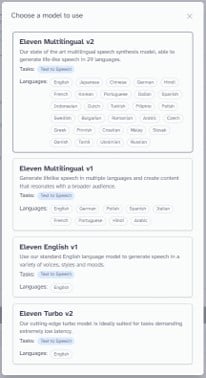
The model list has changed a lot since this screenshot. Here are the ones worth knowing:
-
Eleven v4: ElevenLabs’ newest and most expressive model (September 2026), with 90+ languages and audio tags for emotion and delivery. It works with both instant and professional clones, and a clone recorded in one language can speak the others.
-
Eleven v4 Turbo: The low-latency version of v4, built for real-time uses like voice agents.
-
Eleven v3: The previous expressive model, covering 70+ languages.
-
Eleven Multilingual v2: The stable workhorse for long-form narration in 29 languages including English, Japanese, Chinese, German, and many more. Perfect for social media narration and AI dubbing services.
-
Eleven Flash v2.5: A fast, cheaper model (around 75ms) in 32 languages. ElevenLabs now recommends its Flash models over the Turbo v2 I originally covered, which is deprecated.
Eleven v4 or Multilingual v2 will be just fine for most users.
Finally, the text window is where you enter and generate your AI voice clone.
In the bottom left, you can see a character count, with up to 5,000 characters per generation on paid plans.
In the bottom right, you can see your credits remaining for the month based on your subscription plan.
ElevenLabs
✅ Automatically translates audio into 90+ languages
✅ Perfect for Instagram, YouTube, and TikTok creators
✅ Agreed best voice cloning tool on the market
How to Make Better Voice Clones
Cloning a voice using AI technology has advanced significantly, allowing for more realistic and nuanced reproductions of a person’s voice.
The process involves feeding voice recordings into an AI model, which then learns the unique characteristics of that voice, including pitch, tone, cadence, and emotional inflections.
The AI then generates new speech in the cloned voice based on the text input it receives.
While there isn’t a universally acknowledged “magic bullet” phrase or passage that can capture the entire vocal range of a person for cloning purposes, the goal is to provide the AI with as broad a spectrum of vocal characteristics as possible.
One caveat from ElevenLabs’ own docs: the clone copies the delivery in your sample, and very dynamic audio gives less predictable results. So let your pitch and pacing vary naturally, but keep the overall tone and recording quality consistent.
This usually involves recording a variety of sounds and linguistic features that the person makes. Here are some aspects to consider for a recording intended to clone a voice effectively:
-
Pitch Variation: Include sentences where the pitch varies naturally, such as questions that typically end in a higher pitch or emotional statements that may have a higher or lower pitch based on the expressed emotion.
-
Emotional Range: Recordings that showcase different emotions (joy, anger, sadness, excitement, etc.) can help the AI learn the subtle changes in the voice that accompany these states.
-
Pacing and Cadence: Including samples where the speaking pace varies can help the AI.
If you’re looking for some dialog to clone your own voice, try this out:
“Early this morning, I wandered through the dew-kissed meadows, where the air was filled with the sweet scent of wildflowers. The chorus of the waking birds sang melodies of freedom, their tunes echoing the colors of the dawn. As I ponder life’s mysteries, my heart swells with a sense of gratitude. For in this ever-changing world, it’s these fleeting moments of beauty and connection that weave the fabric of our existence, guiding us like stars in the velvet night.”
The passage above showcases a rich emotional spectrum, varied pacing, and diverse phonetic content, providing a comprehensive dataset for AI to accurately learn and replicate nuanced vocal characteristics.
How Does Voice Cloning Work?
At the heart of voice cloning technology lies deep learning, a branch of AI. It works by feeding audio data to the neural network which then uses machine learning algorithms to understand the distinct features of the speaker’s voice.
After learning these features, the technology can then generate a synthetic voice that resembles the original voice.
The audio files being fed into the AI voice clone are analyzed for various aspects such as pitch, tone, and cadence, enabling the deep learning algorithms to synthesize speech that carries the same characteristics as the original speech.
Real time voice generation has gone from breakthrough to everyday tool. ElevenLabs’ Eleven v4 Turbo has a median inference latency of around 100ms, fast enough for live conversations, while still preserving the speaking style, emotion, and unique characteristics of the voice.
Is It Legal to Clone Someone’s Voice?
It depends on whose voice it is and what you do with it. Cloning your own voice is fine. Cloning someone else’s needs their clear permission, and using a clone to impersonate, scam, defame or sell stuff without consent can break the law in a lot of places. This isn’t legal advice, but here’s the lay of the land:
-
ElevenLabs’ own rules: Instant clones require you to confirm you have the right and consent to clone the voice, Professional clones only work on your own verified voice, and ElevenLabs blocks cloning of celebrity and other high-risk voices (ElevenLabs safety page).
-
United States: Tennessee’s ELVIS Act added voice to the state’s right of publicity in 2024, and California passed digital replica laws the same year. The FCC ruled in February 2024 that AI-generated voices count as artificial voices under robocall law, which generally means you need the recipient’s consent. A federal bill, the NO FAKES Act, would create a national right over your voice and likeness, but it stalled in the Senate in September 2026.
-
European Union: Since 2 August 2026, the EU AI Act requires anyone publishing a deepfake, including cloned audio that sounds like a real person, to disclose that it’s AI-generated.
-
YouTube: You have to label realistic AI content that makes a real person appear to say something they didn’t. Cloning your own voice for voiceovers doesn’t need a label.
-
Everywhere else: Fraud, privacy, defamation and consumer laws still apply, whatever tool you used.
Bottom line: clone your own voice, or get permission (ideally in writing) from the person whose voice you’re cloning, and label AI audio whenever it could fool someone.
Wrapping Up
Imagine the endless possibilities of using a voice cloning app like ElevenLabs!
You can use this technology for creating digital content, voiceovers, or even to get your AI Assistant to speak in a deep voice. Just get permission before you clone anyone else.
As voice cloning technology adapts and evolves, the accuracy and ease of use of cloning voices will undoubtedly improve, allowing us to create even more realistic and life-like voices.
So next time you think of replicating a voice, ElevenLabs stands as an excellent solution to pioneer the future of AI voice cloning. And if it’s not for you, check out these ElevenLabs alternatives.
Happy Cloning! 😎